- C++ 96.3%
- NASL 2.5%
- Shell 1.2%
| Filename | Latest commit message | Latest commit date |
|---|---|---|
 Jorijn van der Graaf
5b4037955b Linux phones have no banking apps, and a command line is no answer on a phone. The app does everything the nostro command does and, like it, only talks to nostrod: it holds no key and no token. - Nostro.Ui, a toolkit whose screens are functions that fill a frame, ported from imsd-messages ca5cd72d; Nostro.App, the app's state, forms and screens; Nostro.Ui.Shell, which puts them on a Wayland window with Crafter.Graphics; nostro-app; and Nostro.DebugCommands for the --debug-api build. - Client: every method also in an asynchronous form for an sd-event loop, with DaemonMissing and OutcomeUnknown. - nostrod's Flatpak is net.catcrafts.Nostrod now and the app takes net.catcrafts.Nostro; install.sh moves the state. The app's Flatpak, both Flatpaks cross-built for aarch64, and the licence texts they carry. - nostro-fake-system, a made-up bus and bank with a real nostrod on them, to look at the app against. The README's screenshots are taken on it. - The nostro command: an API key's environment is the key's own to say, so --sandbox is for bunq-oauth alone, and a virtual card is listed as VIRTUAL. The published contract changes in three places, before any release (design rule 10): - Transactions' query takes `stored`: answered from what nostrod has stored, without asking the bank. The app searches with it; before, every search was a call to bunq. - AddBunq's `environment` no longer chooses over what the key says of itself: a key of the other environment is refused. - SetCardStatus refuses to freeze or unfreeze a virtual card. bunq reports one as DEACTIVATED however well it pays, and leaves it as it is when asked, without an error. The app is GPL-3.0-only, the library stays LGPL-3.0-only, and no code moved from one to the other (design rule 13). Transaction's schema is unchanged. Verified: the 17 tests pass with every line, function and region of what they link run, and the five lint runs are clean. Every screen was looked at on the made-up system, at a phone's and a desktop's sizes in the light and the dark look, on Plasma under Wayland. What is said of bunq's cards comes from its sandbox, with throwaway users, and from one real virtual card. Known to have been used against production: connecting, and reading accounts, payments and cards. Not known to have been tried: a payment from the app against bunq, OAuth against bunq, and anything on a phone. Building the app takes --graphics=, a Crafter.Graphics checkout on its branch claude/nostro-app, until that branch is merged and pinned here. Co-Authored-By: Claude Fable 5.2 <noreply@anthropic.com> |
||
| .vscode | ||
| assets | ||
| docs/screenshots | ||
| implementations | ||
| interfaces | ||
| lib | ||
| packaging | ||
| tests | ||
| .gitignore | ||
| AGENTS.consumer.md | ||
| AGENTS.template.md | ||
| LICENSE | ||
| LICENSE.GPL | ||
| project.cpp | ||
| README.md | ||
Nostro
A big problem linux phones have is that they don't have banking apps, Nostro tries to change that.
By making a open source app that interfaces with bank APIs.
How Nostro runs
Nostro keeps your bank connections out of reach of the programs you run. Its daemon, nostrod, runs as a system user of its own and holds the bank connections of every user of the machine, each user's in a process of its own. The Nostro app and the nostro command ask nostrod over the system bus, and nostrod asks polkit whether you may:
- Looking at accounts, transactions, requests and cards needs nothing more in your desktop session.
- Paying, scheduling a payment, accepting a request or a draft payment, unfreezing or blocking a card, and changing your bank connections ask for your password every time.
Your desktop draws the password dialog, and it says what it is for: the amount, who is paid, and from which account. Nothing secret goes on the command line: Nostro asks for an API key at a prompt. The app holds none of your keys either: one you type into it goes to nostrod and is forgotten.
The app
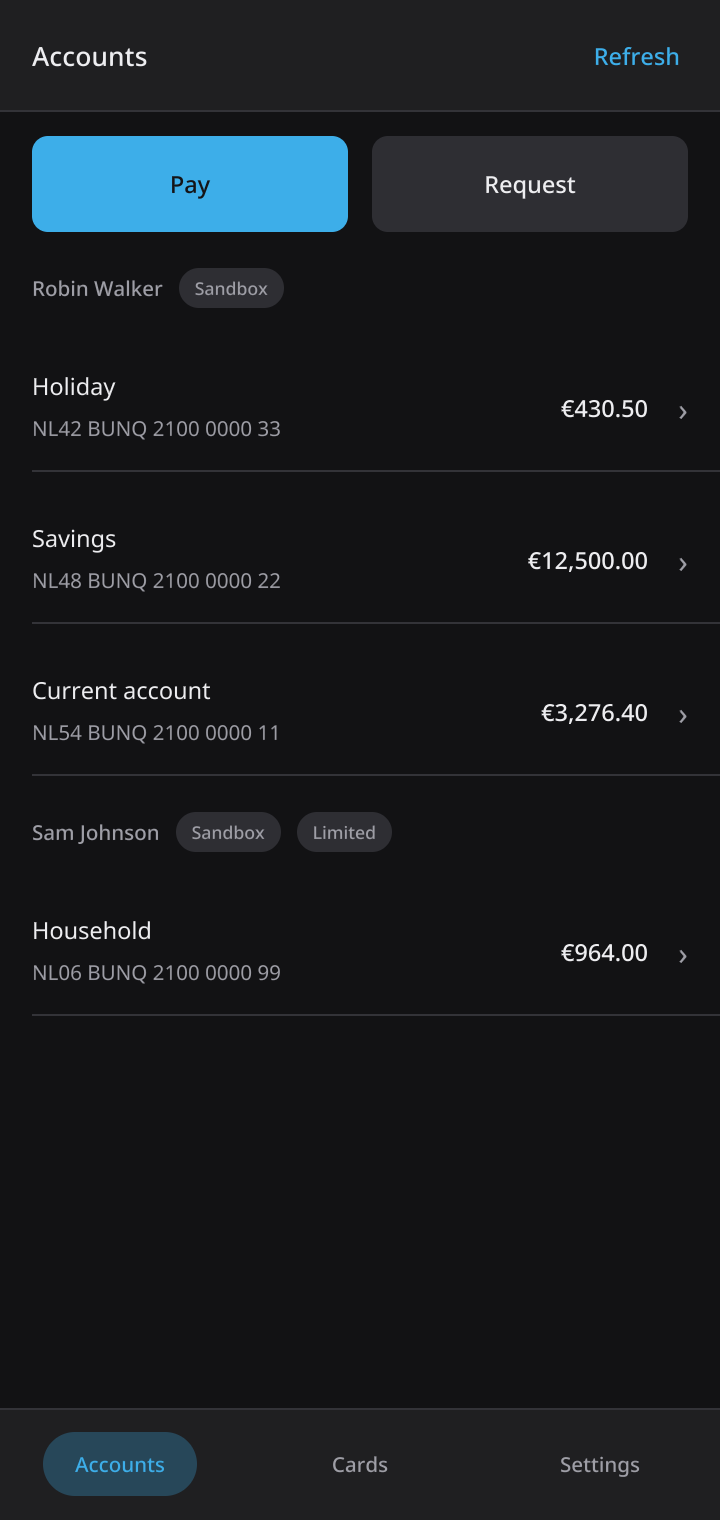
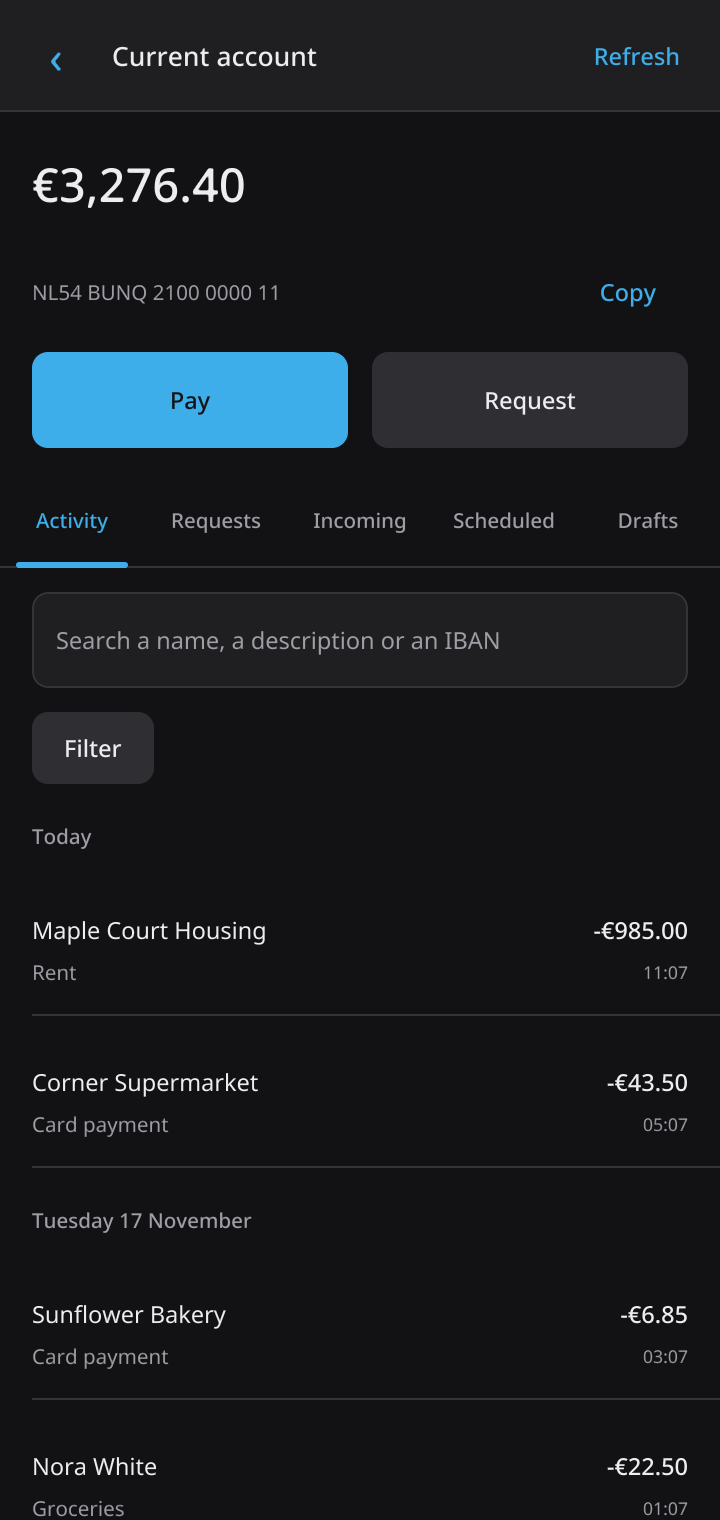
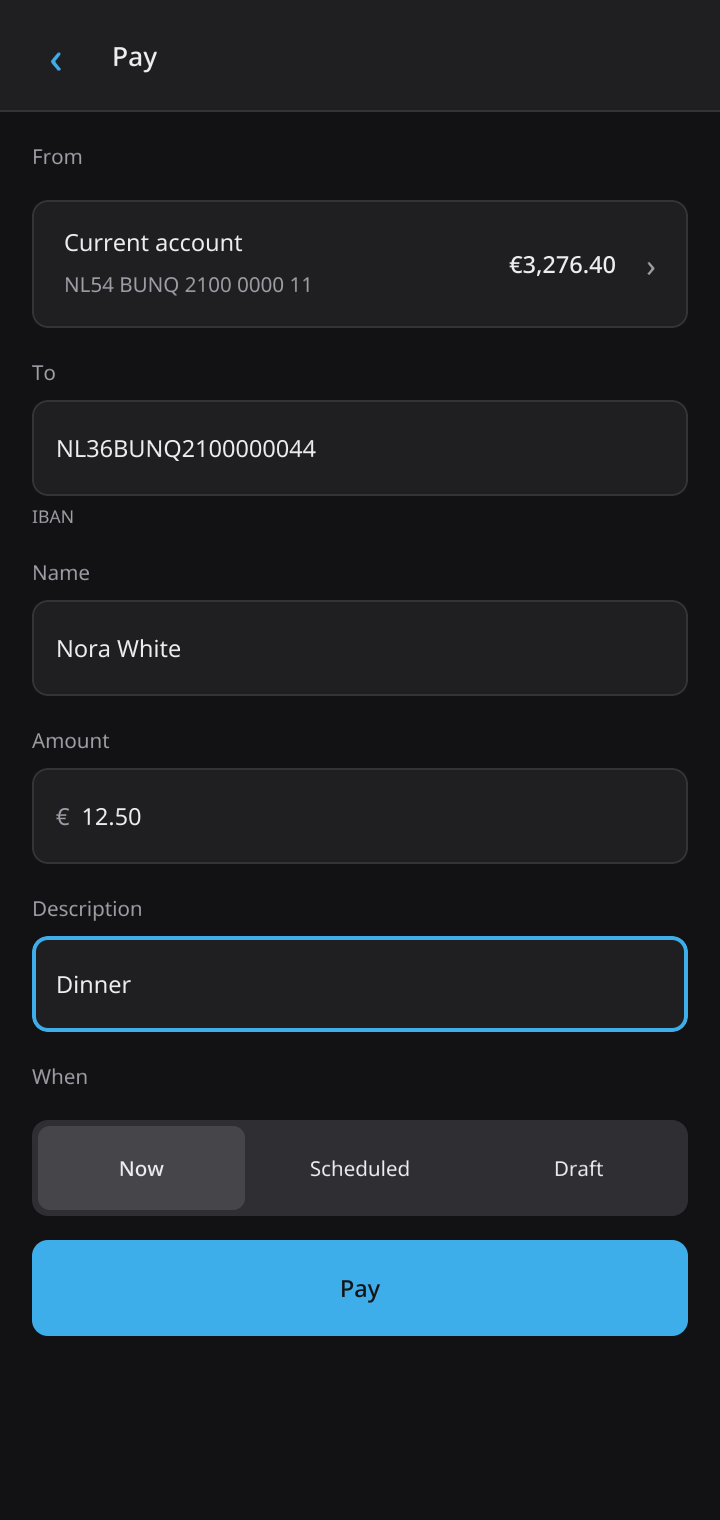
The app is a window for a phone or a desktop. On a phone it shows one page at a time, with Accounts, Cards and Settings along the bottom; in a wider window those are down the side, with your accounts beside them. It follows your desktop's light or dark look and its accent colour.
On a phone, in the dark look:
| Accounts | An account | Pay |
|---|---|---|
 |
 |
 |
In a desktop window, in the light look and in the dark one:
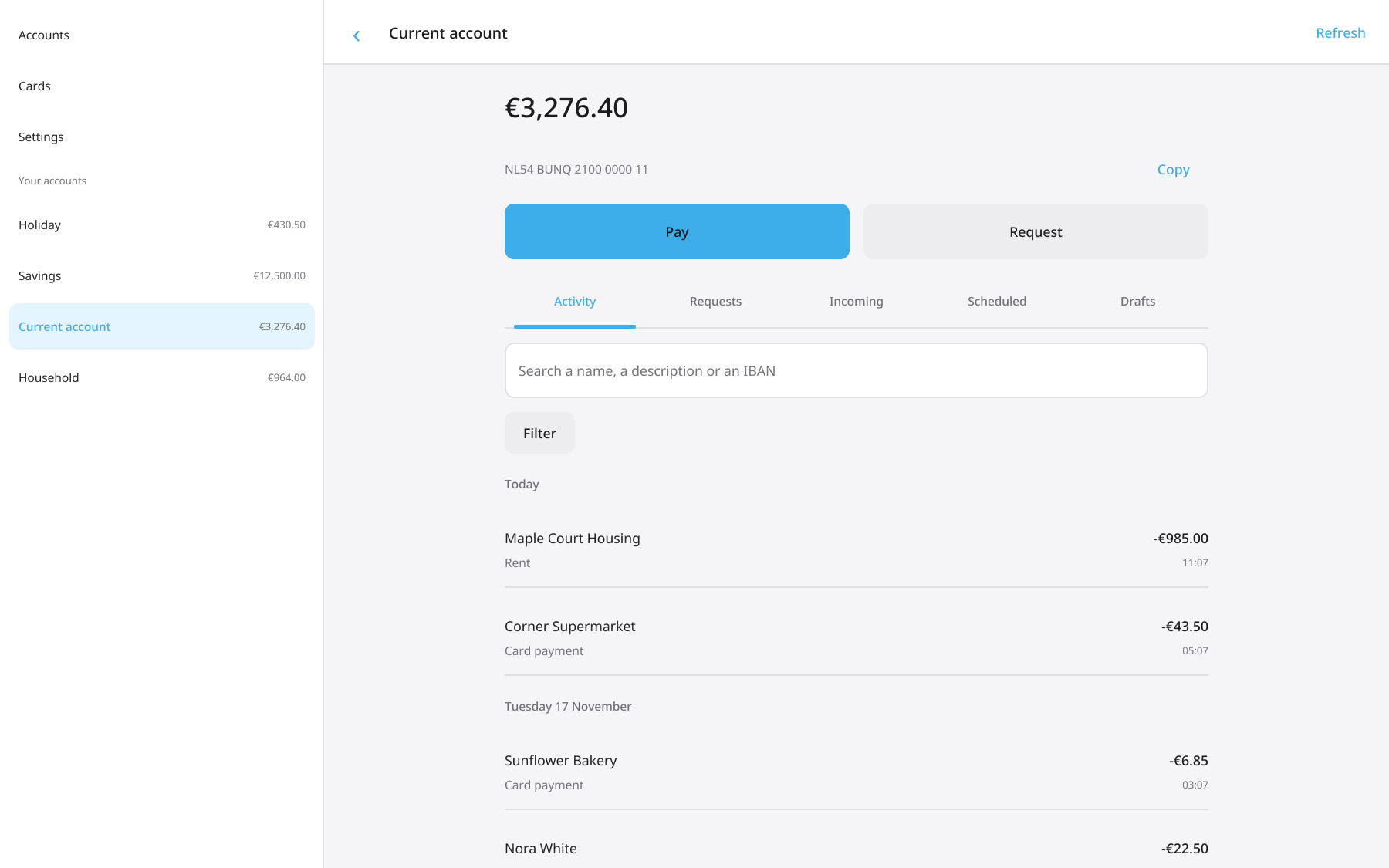
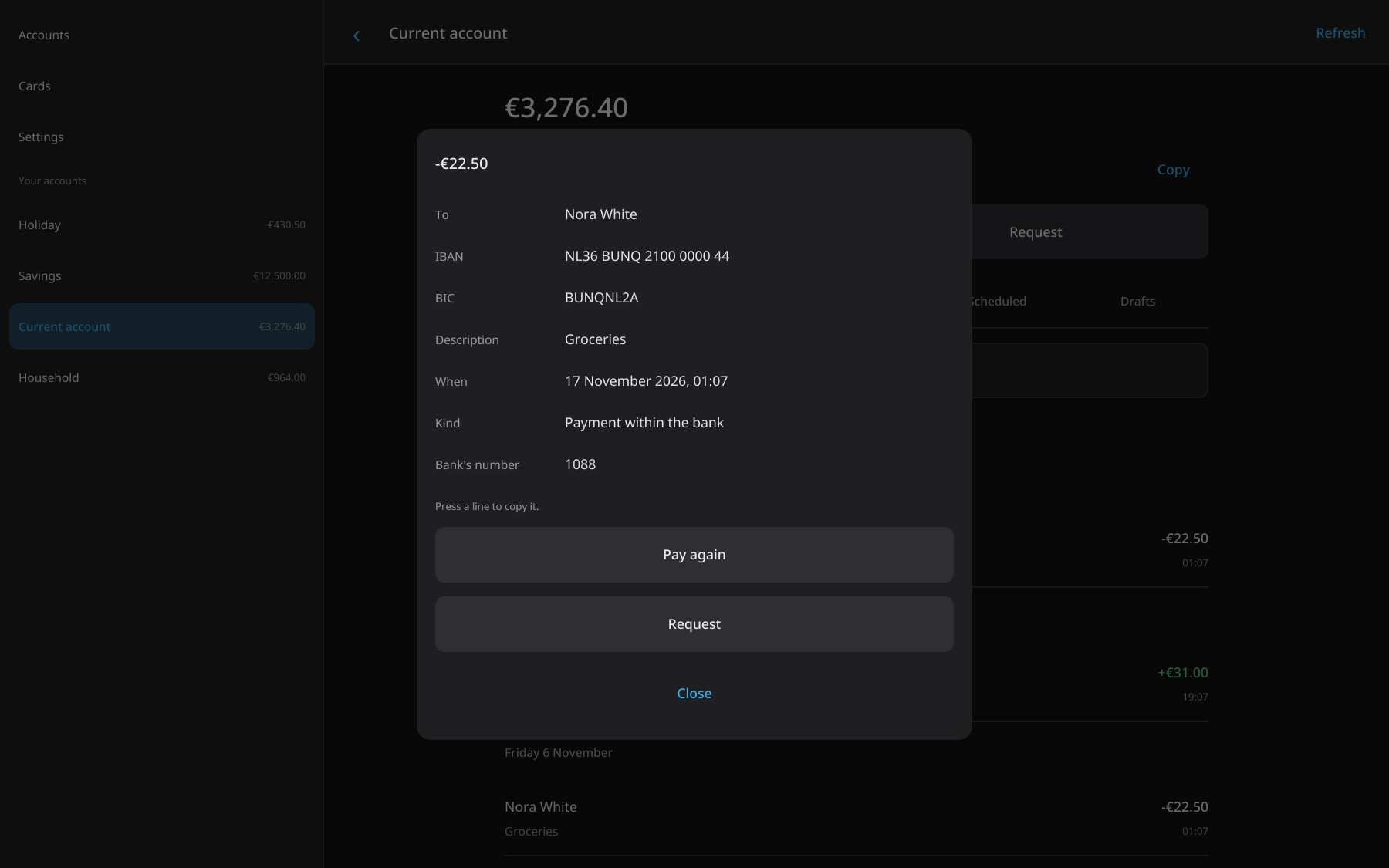
The accounts and the people in these pictures are made up.
It does everything the nostro command does:
| In the app | What it is for |
|---|---|
| Accounts | Your accounts by bank connection, with their balances. Pay and Request start from any of them. |
| An account, Activity | Its payments by day. Search a name, a description or an IBAN, or filter by an exact amount and by dates: that looks through the payments Nostro has read from the bank, as you type. A payment opens with all of its details, and can be paid again or asked back from there. |
| An account, Requests and Incoming | The requests for money you sent, each with its link to copy or open, which you can revoke; and the ones you received, to pay or reject. |
| An account, Scheduled and Drafts | The payments on a schedule, to cancel; and the draft payments, to accept or reject. |
| Pay | From which account, to an IBAN, an e-mail address or a phone number, how much, and what for: now, on a schedule, or as a draft. Its button sends it: a payment is confirmed in your system's password dialog, and a draft is saved at once, to be paid when it is accepted. |
| Request | Ask someone for money. The result has a link to send them. |
| Cards | Your cards and the account each pays from. Freeze or unfreeze one, or report it lost or stolen, which blocks it for good and is asked twice. |
| Settings, Bank connections | Your connections and whether they work. Add one in three steps: your bank, how to connect to it, and what that asks for. bunq connects with an API key or through OAuth. Remove one, which logs it out and deletes its stored payments. |
| Settings, Pay at checkout from | The account apps are paid from at their checkout, see Checkout for apps. |
| Settings, About and security | What Nostro protects you from, and its version. |
- Which bank an account is with makes no difference to how the app shows it or pays from it. Only adding a connection, in the settings, is each bank's own. Until a bank is connected the app offers to connect one.
- A connection that its bank lets pay between your own accounts only, as bunq does one made through OAuth, is marked Limited. A payment from it to anyone else is saved as a draft, to approve in your bank's app.
- The app asks no second question before a payment: Pay sends it, and your system's password dialog is where you confirm it. That dialog is your system's, not the app's, and says what is paid, to whom and from which account: read it. Closing it pays nothing, and leaves the form as you filled it in.
- A card's status is what its bank reports of it. A virtual card is shown as Virtual, and no more: the bank does not report whether one is frozen, and does not freeze or unfreeze one when Nostro asks, so do that in your bank's app. It can be reported lost or stolen like any card. For a plastic card, Deactivated is the bank's word for one that is frozen and for one that was never activated: the card's own sheet says so, and shows how far the bank is with the card.
- If the bank's answer to a payment gets lost on the way, the app says the payment may have been made and shows you the account's payments. It does not offer to try again.
- The app asks a phone's on-screen keyboard for digits at an amount, and to show and learn nothing of a key you type.
- Your accounts, an account's lists and your cards are read again when you pull the page down at its top and let go, or with Refresh in the bar at the top.
- Press a line of a payment's, a request's or a card's details to copy what it says. An IBAN is copied without its spaces.
- With a keyboard: Tab and Shift+Tab move between what can be pressed, Enter presses it, Escape goes back, F5 or Ctrl+R reads the screen again, and Ctrl+F goes to the search. A long press or the right mouse button on a field offers paste, copy and select all.
- The app needs nostrod installed (see Installing). Without it, it says so and how to get it.
Installing
nostrod and the nostro command come as a Flatpak, net.catcrafts.Nostrod, installed for the whole system. A Flatpak cannot install a few system files Nostro needs: nostrod's user, its D-Bus and polkit policies, its systemd unit, and the nostro command. Install both as root. The Flatpak comes from the Catcrafts Flatpak repository, which the first line adds:
flatpak remote-add --system --if-not-exists catcrafts https://flatpak.catcrafts.net/catcrafts.flatpakrepo
flatpak install --system catcrafts net.catcrafts.Nostrod   # the Flatpak
packaging/system/install.sh                                # the system files
The app is a Flatpak of its own, net.catcrafts.Nostro, in the same repository, which each user can install for themselves:
flatpak remote-add --user --if-not-exists catcrafts https://flatpak.catcrafts.net/catcrafts.flatpakrepo
flatpak install --user catcrafts net.catcrafts.Nostro
packaging/system/install.sh --app installs it for every user instead, together with the rest. The app can reach your display, your graphics card and nostrod, and nothing else: no network and none of your files.
packaging/system/uninstall.sh removes everything again. Your bank connections stay in /var/lib/nostro until you give it --purge.
CLI
nostro connectors                                   # connectors, numbered, and whether they work
nostro connectors add bunq [allowed ips, default *]  # asks for the API key; a sandbox key starts with sandbox_
nostro connectors add bunq-oauth {client id} {redirect uri} [--sandbox]   # asks for the client secret
nostro connectors remove {name or number}           # logs out and deletes its stored transactions
nostro accounts                                     # all accounts of all connectors
nostro transactions {account} [--search text] [--amount n] [--from date] [--to date] [--limit n]
nostro send {account} {to} {name} {amount} {description, optional}
nostro request {account} {from} {name} {amount} {description, optional}
nostro requests {account} [revoke {id}]             # requests for money you sent
nostro incoming {account} [accept|reject {id}]      # requests for money you received
nostro schedule {account} {to} {name} {amount} {start date} {once|daily|weekly|monthly|yearly} {description, optional} [--every n] [--until date]
nostro scheduled {account} [cancel {id}]
nostro draft {account} {to} {name} {amount} {description, optional}
nostro drafts {account} [accept|reject {id}]
nostro cards [freeze|unfreeze|lost|stolen {card id}]
nostro checkout account [{account}]                 # the account apps may ask you to pay from, see Checkout
{account}is an account's name or its IBAN. Use the IBAN when two accounts share a name.{to}and{from}are an IBAN, an e-mail address, or a phone number starting with+. IBANs are checked before anything is sent.- Amounts are in the smallest unit of your currency, so for EUR
1250is €12.50. - Dates are
YYYY-MM-DDor"YYYY-MM-DD hh:mm", in local time. nostro cardslists a virtual card asVIRTUAL. bunq does not say whether one is frozen and does not freeze or unfreeze one when asked, sofreezeandunfreezerefuse it;lostandstolenwork.
Supported banks
Checkout for apps
An app, such as a shop, can have the user's Nostro pay an order. Nostro pays it from the account the user chose once, in the app's settings or with nostro checkout account {account}, after the user has confirmed the payment with their password at a prompt that shows the amount, the payee, the reference and that account. The app never names or sees the account, and gets back only the payment's id. An account connected through OAuth cannot pay a shop, so it cannot be chosen.
Apps talk to net.catcrafts.Nostro1.Checkout on the system bus. A Flatpak app asks for it with --system-talk-name=net.catcrafts.Nostro1.Checkout in its finish-args, which reaches nothing else of Nostro. The interface is one method, documented in packaging/dbus/net.catcrafts.Nostro1.Checkout.xml:
Pay(payeeIban s, payeeName s, amount x, currency s, reference s, options a{sv}) -> (paymentId t, results a{sv})
- The payee is an IBAN. The amount is in the currency's smallest unit (
1250is €12.50), and the currency isEUR. The reference is your order number: it becomes the payment's description, and it tells orders apart. - Allow interactive authorization on the call, make the call asynchronously, and give it a timeout of minutes, because the user may take a while at the prompt.
- An order is paid once. Calling
Payagain with the same IBAN and reference, after a timeout or a crash, returns the first payment withrepeatedset to true inresults, without asking the user. While the user is still at the prompt, the second call waits for the first. The same reference with another amount is refused. net.catcrafts.Nostro1.Error.Cancelledmeans the user did not confirm, andNoCheckoutAccountthat they have not chosen an account.org.freedesktop.DBus.Error.ServiceUnknownmeans Nostro is not installed. The XML lists the other errors.- Ignore keys you do not know in
results, because later versions may add some. Nostro ignores options it does not know. - A payment id is not a receipt. Confirm the money arrived with your own bank.
From a shell:
busctl call --system --timeout=10min net.catcrafts.Nostro1.Checkout /net/catcrafts/Nostro1 \
    net.catcrafts.Nostro1.Checkout Pay 'ssxssa{sv}' NL91ABNA0417164300 'Shop BV' 1250 EUR order-1234 0
Generate a proxy from the XML with gdbus-codegen (GLib and GTK), qdbusxml2cpp (Qt) or zbus-xmlgen (Rust). A C++ app built with Crafter.Build can depend on Nostro with --product=checkout instead. That builds the Nostro.Checkout module alone, which links only libsystemd:
import Nostro.Checkout;

const Nostro::Checkout::Paid paid = Nostro::Checkout::Pay({.payeeIban = "NL91ABNA0417164300", .payeeName = "Shop BV", .amount = 1250, .reference = "order-1234"});
Pay blocks until the user has answered, so call it off the UI thread. It throws Nostro::Checkout::Cancelled, Nostro::Checkout::NoCheckoutAccount, or Nostro::Checkout::Error with the D-Bus error name.
Any app the user runs with access to the checkout can ask whether an order was paid, by asking for it again with the same IBAN, reference and amount: it gets the payment id without a prompt. Nostro cannot tell which app is asking, so a reference should be hard to guess.
Contributing
Nostro gladly accepts contributions to add more banks!
Please add a connector for the bank you want to add and git send-email the patch to jorijnvdgraaf@catcrafts.net
Please add thorough testing coverage for te bank you are submitting.
For 100% certainity blind submissions for connectors are not accepted, they must be tested against either the live or sandbox API.
Security
Please report security vuneribilities to jorijnvdgraaf@catcrafts.net before publishing them.
What Nostro protects you from, and what it does not:
- Programs you run cannot read your bank connections, which belong to nostrod's own user, and cannot move money without your password. The Nostro app is one of those programs: it holds no key and no token.
- The password dialog is your desktop's. A program running as you could still draw one that looks the same, so type your password only for something you asked for, and check what the dialog says.
- Over SSH, or in any session without a polkit agent, nothing can ask for your password, so whatever needs it is refused.
- The bank connections are not encrypted on disk: root, and anyone holding the disk, can read them. Use full-disk encryption.
- An administrator can change what needs a password with polkit rules in
/etc/polkit-1/rules.d/, for example an amount above which an administrator must approve a payment. Each dialog gives rulesamount_minor,currency,counterparty,account_ibanandenvironment, and at checkoutreference.
License
Nostro has two licences, and each source file says in its first line which one it is under:
- The library, nostrod, the
nostrocommand and the checkout library are LGPL-3.0-only, see LICENSE. A program under another licence can be built on the library or the checkout. - The app is GPL-3.0-only, see LICENSE.GPL: its screens, the toolkit they are built with and its window (the modules
Nostro.Ui,Nostro.AppandNostro.Ui.Shell, andnostro-app). A program built from any of it is under the GPL as a whole.
The app is set in Noto Sans, under the SIL Open Font License (assets/OFL.txt); packaging/licenses/NOTICE lists what else the Flatpaks carry.
Copyright
Copyright (C) 2026 Catcrafts® catcrafts.net